Hello World (Python)
Code walkthrough
Section titled “Code walkthrough”We’ll now walk through the different parts of the code, to see how we validate the user’s input from the form we’ve just seen, display the sample, and print the editions.
Configuration
Section titled “Configuration”All the code for our publication is in publication.py so let’s look through this step-by-step (here’s the complete file on GitHub):
# coding: utf-8from datetime import datetimeimport dateutil.parserfrom flask import Flask, abort, json, jsonify, make_response, render_template, Response, request, send_from_directoryimport hashlib
# Default configurationDEBUG = False
# Define greetings for different times of the day in different languages.GREETINGS = {    'english':      ('Good morning', 'Hello', 'Good evening'),    'french':       ('Bonjour', 'Bonjour', 'Bonsoir'),    'german':       ('Guten morgen', 'Hallo', 'Guten abend'),    'spanish':      ('Buenos días', 'Hola', 'Buenas noches'),    'portuguese':   ('Bom dia', 'Olá', 'Boa noite'),    'italian':      ('Buongiorno', 'Ciao', 'Buonasera'),    'swedish':      ('God morgon', 'Hallå', 'God kväll'),}
app = Flask(__name__, static_url_path='')app.config.from_object(__name__)# If there's a HELLOWORLD_SETTINGS environment variable, which should be a# config filename, use those settings:app.config.from_envvar('HELLOWORLD_SETTINGS', silent=True)
First we import nececssary modules, and then we set up our Flask application. Between the two we declare two configuration properties, the most important being GREETINGS, which will be available as app.config['GREETINGS'], and contains data about all of the greetings we use for our publication.
This variable contains different languages, and for each language greetings for morning, afternoon and evening. The keys to this array are the same as those defined in the lang form element in /meta.json.
Static files and ’/’
Section titled “Static files and ’/’”@app.route('/')def root(): return make_response('A Little Printer publication.')
@app.route('/meta.json')@app.route('/icon.png')def static_from_root(): return send_from_directory(app.static_folder, request.path[1:])We set up a few basic routes here.
We don’t need to have anything at the root level of our publication: BERG Cloud never tries to access it, and no one else should it. But it seems neater to at least display something.
To serve the two static files required by BERG Cloud we need to set Flask up to serve them from our /static/ directory.
/validate_config/
Section titled “/validate_config/”In our meta.json we specified two config variables, name and lang which the user supplies values for when they subscribe to the publication. When they submit the form, BERG Cloud Remote POSTs those values to /validate_config/ to check they meet the publication’s requirements.
The data will arrive in a JSON-formatted string. If we get the value of the POST’s config variable, it will contain something like this:
{ "name": "Alice", "lang": "english" }Our publication’s response should be JSON, rather than an HTML page and should look like this if validation succeeds:
{ "valid": true}Or something like this if validation fails:
{ "valid": false, "errors": [ "Please enter your name into the name box.", "Please select a language." ]}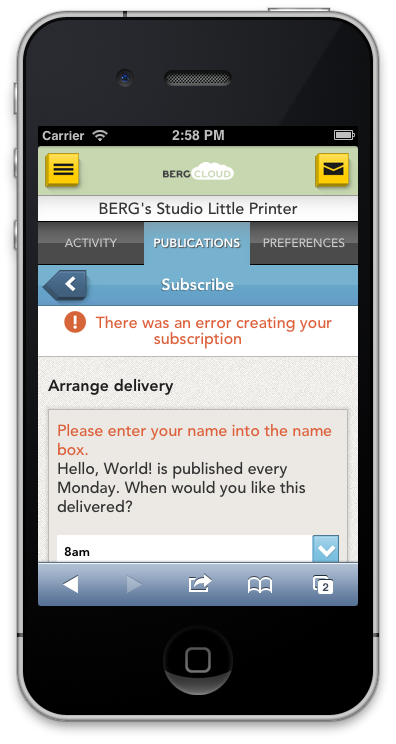
That would result in the user seeing something like the screen shown here, with the publication’s error messages shown on BERG Cloud Remote.
We’ll look at how our Hello World publication does this validation. When /validate_config is POSTed to, we first do a bit of checking and preparation before the validation itself:
@app.route('/validate_config/', methods=['POST'])def validate_config():    if 'config' not in request.form:        return Response(response='There is no config to validate', status=400)
    # Preparing what will be returned:    response = {        'errors': [],        'valid': True,    }
    # Extract the config from the POST data and parse its JSON contents.    # user_settings will be something like: {"name":"Alice", "lang":"english"}.    user_settings = json.loads(request.form.get('config', {}))
First, we ensure this POST request includes a config field. If not, we return a 400 status code.
Then, we prepare the structure that we will return as JSON.
Next we parse the variables received as JSON in the config field, ready for the actual validation.
    # If the user did not choose a language:    if 'lang' not in user_settings or user_settings['lang'] == '':        response['valid'] = False        response['errors'].append('Please choose a language from the menu.')
    # If the user did not fill in the name option:    if 'name' not in user_settings or user_settings['name'] == '':        response['valid'] = False        response['errors'].append('Please enter your name into the name box.')
    if user_settings['lang'].lower() not in app.config['GREETINGS']:        # Given that the select field is populated from a list of languages        # we defined this should never happen. Just in case.        response['valid'] = False        response['errors'].append("We couldn't find the language you selected (%s). Please choose another." % user_settings['lang'])
    return jsonify(**response)
Both of our fields, name and lang are required, so we make sure both are present and have values. If not, we set the validity of our response to false, and add an error message.
Then we ensure that the value supplied for lang does match one of the greeting languages we defined earlier. This should always be the case, but it’s always best to be careful with input from sources external to our code.
That done, we just need to return our response – whether successful or not – as JSON. And that’s the validation done; users should be able to subscribe to our publication now.
/sample/
Section titled “/sample/”Requests for /sample/ always display the same content, so we need to set up which of our greetings we want to display each time.
@app.route('/sample/') # The values we'll use for the sample: language = 'english' name = 'Little Printer' response = make_response(render_template( 'edition.html', greeting="%s, %s" % (app.config['GREETINGS'][language][0], name), )) response.headers['Content-Type'] = 'text/html; charset=utf-8' # Set the ETag to match the content. response.headers['ETag'] = '"%s"' % ( hashlib.md5( language + name + datetime.utcnow().strftime('%d%m%Y') ).hexdigest() ) return responseHere, we set the parameters to use for the greeting we want to display in our sample (the language and name). We construct the text of the greeting using these and the first of the three greetings for that language.
We set the Content-Type header, to be sure that our text displays as expected (in PHP and Python; Sinatra does this by default).
We also set the ETag header. This is a string that indicates to BERG Cloud when content changes. It will look something like this (the quotes are part of the ETag’s content):
"29c091418ead4585817a00930602519c"Because requests to /sample/ will always return the same content we don’t need to change the ETag each time. However, we will make it change each day, hence the use of the date when generating it. Otherwise, if we changed our sample content in some way, BERG Cloud may never know, because it would always see the same ETag and never fetch the fresh content. If we change the ETag daily then the first request BERG Cloud makes for the sample each day will result in our content being fetched.
ETags can be fiddly things to get right, so be sure to read more about them in the Reference section. We’ll also come across them again when we look at what happens when /edition/ is called.
/edition/
Section titled “/edition/”When it’s time for a subscriber to receive a new delivery of our publication, BERG Cloud makes a request to /edition/. It might send some parameters in the URL, depending on what the contents of the publication’s meta.json requires. You can read more about meta.json in the Reference section.
This publication’s file results in /edition/ being called with one standard parameter, local_delivery_time, and two custom ones that we defined, lang and name. So a request from BERG Cloud will be to a URL something like this:
/edition/?local_delivery_time=2013-11-18T23:20:30-08:00&lang=english&name=AliceHere, local_delivery_time is set to 2013-11-18T23:20:30-08:00. This tells us the date and time wherever the requesting Little Printer is located. We can see that it’s currently 18th November 2013 for this Little Printer, in the -08:00 timezone. Remember that our publication only appears on Mondays, which it currently is for this Little Printer.
There are also our custom fields, lang and name. The values for these are english and Alice, which were entered by the user when they subscribed. This data is stored on BERG Cloud and sent to a publication when it’s time to deliver an edition.
Now let’s look at what our code does when this URL is requested. This is a little more involved than the code for /sample/, so we’ll take it one step at a time.
@app.route('/edition/')def edition():    # Extract configuration provided by user through BERG Cloud.    # These options are defined in meta.json.    language = request.args.get('lang', '')    name = request.args.get('name', '')
    if language == '' or language not in app.config['GREETINGS']:        return Response(            response='Error: Invalid or missing lang parameter', status=400)
    if name == '':        return Response(response='Error: No name provided', status=400)
    try:        # local_delivery_time is like '2013-11-18T23:20:30-08:00'.        date = dateutil.parser.parse(request.args['local_delivery_time'])    except:        return Response(                    response='Error: Invalid or missing local_delivery_time',                    status=400)
Here, we get the values for lang and name from the GET arguments, and return 400 status codes if either of those are missing. We also check the supplied value for language matches our array of greetings.
Similarly, we attempt to parse the local_delivery_time and return a 400 status code if that fails to generate a usable date object. Remember, this is the date in the Little Printer’s timezone, so we don’t want to convert it to UTC or anything else.
Next we check that it’s the correct day of the week to print an edition:
# The publication is only delivered on Mondays, so if it's not a Monday in # the subscriber's timezone, we return nothing but a 204 status. if date.weekday() != 0: return Response(response=None, status=204)We check the date (in the Little Printer’s timezone) to see if this is a Monday or not. If it’s not, then we return a 204 status code; this indicates to BERG Cloud that there’s nothing to display today.
Now we know we have valid data, and it’s the correct day to deliver content, we can do that:
    # Pick a time of day appropriate greeting.    i = 1    if date.hour >= 0 and date.hour <= 3:        i = 2    if date.hour >= 4 and date.hour <= 11:        i = 0    elif date.hour >= 12 and date.hour <= 17:        i = 1    elif date.hour >= 18 and date.hour <= 23:        i = 2
    # Base the ETag on the unique content: language, name and time/date.    # This means the user will not get the same content twice.    # But, if they reset their subscription (with, say, a different language)    # they will get new content.    response = make_response(render_template(                'edition.html',                greeting="%s, %s" % (app.config['GREETINGS'][language][i], name)            ))    response.headers['Content-Type'] = 'text/html; charset=utf-8'    response.headers['ETag'] = '"%s"' % (            hashlib.md5(                language + name + date.strftime('%H%d%m%Y')            ).hexdigest()        )    return response
We’re on the final stage of outputting the edition for this user. First, we determine which of the three greetings to use, based on the hour of the day: the morning, afternoon or evening version.
We then output the response, in a similar way to we did for /sample/, above. The main difference here is with the ETag. In general, ETags should change whenever the content changes, so we use the language and name to generate it. However, we’re also using today’s date so that the ETag will change each day, just in case we make tweaks to the publication. We don’t want BERG Cloud to cache the content forever, which is what would happen if we used only the our two configuration parameters.
The HTML template
Section titled “The HTML template”We’ve now seen all the code that passes variables into our template. Publications are just web pages, so there’s nothing remarkable about the template, which is used for both /sample/ and /edition/.
As a reminder of what the template generates, here’s the /sample/ rendered page from the live publication.
All the CSS for the template is in its <head> section:
<!DOCTYPE html><html> <head> <meta charset="utf-8" /> <title>Hello World</title> <style type="text/css"> body { background: #fff; color: #000; width: 384px; margin: 0px; padding: 20px 0px; } h1 { word-wrap: break-word; font-family: Arial, sans-serif; } </style> </head></html>Most Little Printer publications will have some base styles similar to those for the body tag here. Everything must be black and white, and the publication must be 384 pixels wide. It’s good to have some space at the top and bottom of the publication (and maybe borders too) to separate it from others. And it should use one of the allowed fonts.
The rest of the template looks like this:
<body>
  <h1>{{ greeting }}</h1>
</body></html>
Not much to it! We display the greeting variable that was prepared for our /edition/ or /sample/ and that’s all.
Next steps
Section titled “Next steps”If you’ve got that all up and running, congratulations! But what next? This publication is unlikely to keep subscribers interested for long.
Our Miniseries example shows how to create a publication that delivers a series of images or text, in order, to subscribers. In some ways it’s simpler than this Hello World example, in that it doesn’t require any custom configuration variables, although you could combine the two…
Now you know how to ask a user for some configuration when they subscribe, what kind of things could you ask them for, and what could you do with that? Provide some useful content in different languages? Or based on their location, age, interests…?
There are many examples of more complex publications with code available to look through. These often show different ways of pulling in content from third-party sources to provide custom content to the user.