Hello World
This example publication is a basic structure for a publication. It shows what’s required to generate a sample, an edition (which is what is printed by subscribers’ Little Printers), and how to set and validate configuration options.
The content printed by subscribed Little Printers in this example is very basic – a simple greeting that will be printed every Monday. The subscriber chooses their language and enters their name. Every Monday they will receive a greeting in their language, appropriate to the time of day where their Little Printer is.
A Little Printer publication is a small website, so you’ll need to be reasonably comfortable with writing server-side code. We’ll walk through this example, looking at one part at a time, in PHP, Python, and Ruby.
The Ruby version is also deployed on Heroku at http://bergcloud-hello-world.herokuapp.com/sample/.
lp-hello-world-php/ edition/ index.php functions.php icon.png index.php meta.json README.md sample/ index.php validate_config/ index.php template.phpIf you upload these files to your webserver you should be able to view the site. For example, if your domain is example.org, and you uploaded the lp-hello-world-php directory with its contents, you should be able to visit http://www.example.org/lp-hello-world-php/sample/ and see something like this:
lp-hello-world-python/ Procfile publication.py README.md requirements.txt static/ icon.png meta.json templates/ edition.htmlFollow the instructions in the README to get the site up and running. If your domain is example.org, you should be able to visit http://www.example.org/sample/ and see something like this:
lp-publication-hello-world/ config.ru Gemfile Gemfile.lock public/ icon.png meta.json publication.rb README.md views/ edition.htmlFollow the instructions in the README to get the site up and running. If your domain is example.org, you should be able to visit http://www.example.org/sample/ and see something like this:

The different paths that are required for Little Printer publications are described in the Reference section.
Before looking at the code itself, there are two static files that all publications must have. /icon.png is used on BERG Cloud Remote when displaying information about the publication. The other required file is /meta.json…
meta.json
Section titled “meta.json”This is our publication’s /meta.json file in the standard format:
{ "owner_email": "publishers@bergcloud.com", "publication_api_version": "1.0", "name": "Hello, World!", "description": "Example publication for Little Printer", "delivered_on": "every Monday", "external_configuration": false, "send_timezone_info": true, "send_delivery_count": false, "config": { "fields": [ { "type": "text", "name": "name", "label": "Enter your name" }, { "type": "select", "name": "lang", "label": "Select your greeting language", "options": [ ["English", "english"], ["French", "french"], ["German", "german"], ["Spanish", "spanish"], ["Portuguese", "portuguese"], ["Italian", "italian"], ["Swedish", "swedish"] ] } ] }}The name and description field are used to generate the publication’s listing on BERG Cloud Remote. The delivered_on field is also used there, to complete the phrase “Delivered…”. In this publication’s case, it only appears on Mondays.
external_configuration is false because this publication doesn’t require the subscriber to authenticate with a third-party website.
send_timezone_info is true, which means that when generating an edition for a Little Printer, BERG Cloud will send the current time in that Little Printer’s timezone to all calls for /edition/.
send_delivery_count is false because this publication doesn’t keep track of how many times a subscriber has received an edition. This would be true for miniseries publications, which have a series of distinct editions.
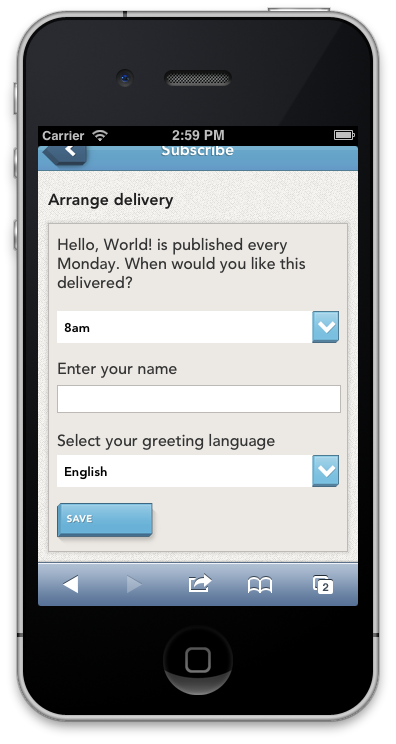
Finally config describes the form that users must fill in when subscribing to the publication. It sets up a text field for the user’s name and a drop-down menu for selecting a language. The screenshot here shows what the form looks like on BERG Cloud Remote.
In the Reference section there’s an example of all the possible types of form fields.