/configure/
Some publications might require subscribers to authenticate with a third party. For example, a publication displaying your Facebook friends’ birthdays would need you to authenticate with Facebook. This would allow the publication access to specified information from your Facebook account. This is more complicated, and can require storing users’ authentication tokens in a database.
If a publication requires this process, setting "external_configuration":true in [meta.json][] will cause an additional step to be added to the subscription process. BERG Cloud Remote will redirect the user to the publication’s /configure/ endpoint, at which point the publication can do whatever is necessary for authentication. The user should then be returned to the return_url BERG Cloud supplied, along with an authentication token. If something goes wrong, the user should be returned to the supplied error_url instead.
Step-by-step
Section titled “Step-by-step”1. Starting the subscription process
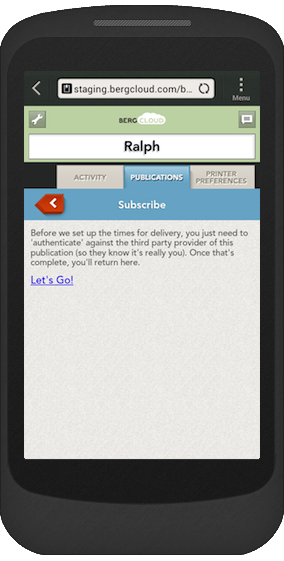
If a publication has "external_configuration":true set in its meta.json file, then when the user clicks the “Subscribe” link on BERG Cloud Remote they will encounter a new page that looks like the screenshot shown here.
2. Requesting /configure/
Clicking the “Let’s Go!” link sends the user to the publication at the /configure/ endpoint. This GET request will be to a URL like this:
http://example.org/configure/?return_url=http://bergcloud.com/publications/12345/subscription_configuration_return&error_url=http://bergcloud.com/publications/12345/subscription_configuration_failureThere are two GET parameters passed to /configure/ here: return_url and error_url. These will be needed after the user has authenticated, and so should both be saved (maybe in cookies), or passed to the authenticating service as values that will be returned.
3. Authentication
The publication’s code should go through whatever is necessary to authenticate the user with the chosen service. This usually involves a variety of OAuth, and the implementation differs depending on the OAuth version, the service, and the programming language and libraries used.
If anything goes wrong during the authentication process (such as the user failing to authenticate or changing their mind) the user should be redirected to the URL contained in error_url, where they will be presented with a generic error message.
4. Returning to BERG Cloud Remote
Once a user has successfully authenticated, the publication will probably have some kind of authentication token, a string. This should be returned to BERG Cloud Remote, appended to the return_url as part of a GET parameter.
For example, if the authentication token is 1234567890 and the return_url is http://bergcloud.com/publications/12345/subscription_configuration_return then the user should be redirected to:
http://bergcloud.com/publications/12345/subscription_configuration_return?config[access_token]=123456790The GET parameter here has a key of config[access_token] and a value of 123456790.
Note that it is possible for a user to return to BERG Cloud Remote and not complete the subscription process at this point. So there is no guarantee that someone who authenticates with a publication will then be subscribed.
5. Requests to /edition/
This access token value sent to BERG Cloud is stored and sent when a request to /edition/ is made for this subscriber. In this example, subsequent requests to /edition/ would look like this:
http://example.org/edition/?access_token=12345678910If the publication also had some config options set (see validate_config), the values for these would also be sent at this point.
Other uses
Section titled “Other uses”While the main use of this configuration step is for third-party authentication, it’s possible to use it for presenting your own configuration options, instead of, or as well as, the authentication.
For example, our Daily Weather publication doesn’t require users to authenticate but, when the user is sent to /configure/, it presents them with a form to select a location. This form uses a map and is beyond the scope of the basic config form offered by BERG Cloud Remote.
If a publication does this, it can either send the values from the custom form back to BERG Cloud, or save them in a local database with a unique ID for the user, and return that ID.
In the former case, using Daily Weather as an example, we might have two values to save, a location (as latitude and longitude) and an address string. The user might be returned to a URL like this:
http://bergcloud.com/publications/12345/subscription_configuration_return?config[location]=51.4447221,-2.6089002&config[address]=15%20Raleigh%20Road,%20BristolThis publication also has a config option set that presents the user with a choice of scale (Celsius or Fahrenheit) once they’re back at BERG Cloud Remote. So BERG Cloud’s requests for /edition/ would then look something like this:
http://example.org/edition/?scale=celsius&location=51.4447221,-2.6089002&address=15%20Raleigh%20Road,%20BristolThe GET parameters include both location and address as well as scale.
If, instead, the publication stored the form data locally, it would have to generate a unique ID and return that to BERG Cloud Remote like this:
http://bergcloud.com/publications/12345/subscription_configuration_return?config[id]=6addcab0-46fc-11e3-8f96-0800200c9a66In that case, BERG Cloud would send its requests to /edition/ like this:
http://example.org/edition/?id=6addcab0-46fc-11e3-8f96-0800200c9a66The publication would then use that ID to fetch the stored configuration data for that user.
Example
Section titled “Example”Here is an example of the authentication step, using the Instagram API via the instagram gem. This is part of a Ruby and Sinatra app:
# The user arrives here from BERG Cloud Remote during the subscribe process.get '/configure/' do  # Set a cookie so we know where to return the token to when it's returned by Instagram.  # BERG Cloud will pass us a return_url which is specific to our publication on BERG Cloud.  if params[:return_url]    response.set_cookie('bergcloud_return_url',      :value => params[:return_url], :domain => request.host, :path => '/',      :expires => Time.now + 86400) # Validity of one day  else    # Should never happen.    return 400, 'No return_url parameter was provided.'  end
  # Exactly the same thing for the error_url.  if params[:error_url]    response.set_cookie('bergcloud_error_url',      :value => params[:error_url], :domain => request.host, :path => '/',      :expires => Time.now + 86400) # Validity of one day  else    # Should never happen.    return 400, 'No error_url parameter was provided.'  end
  # Send the user to Instagram to authorise, ask Instagram to return to /return/.  redirect Instagram.authorize_url(    :redirect_uri => 'http://bergcloud-instagram.herokuapp.com/return/')end

# Returned from Instagram!get '/return/' do  if request.cookies['bergcloud_return_url'].nil? || request.cookies['bergcloud_error_url'].nil?    return 500, 'Cookies were expected, but are missing. Are cookies enabled? Please return to BERG Cloud and try again.'  else    return_url = request.cookies['bergcloud_return_url']    error_url = request.cookies['bergcloud_error_url']  end
  # Instagram passes us a :code which we can exchange for an access token.  if params[:code]    # Exchange the code from Instagram for an access token.    response = Instagram.get_access_token(                  params[:code],                  :redirect_uri => 'http://bergcloud-instagram.herokuapp.com/return/')
    if response.access_token      # If this worked, send the access token back to BERG Cloud.      redirect "#{return_url}?config[access_token]=#{response.access_token}"    else      # Unable to retrieve access token from Instagram.      redirect error_url    end  else    # No code returned by Instagram.    redirect error_url  endend
Source: Wayback Machine